

Over 3,000 construction projects trust Valoon


Valoon Studio
You describe what you need — Studio builds the view.
Valoon Studio is the AI feature of the Valoon construction software that lets construction companies create their own views, dashboards, and reports from their project data. Users describe what they need in their own words — say, an hours dashboard, a daily-report check, or an overview of reported disruptions — and Valoon Studio builds the matching view from the data already in Valoon. Once created, every view stays saved, can be shared with the team, and keeps working with live data.
Material demand – next two weeks
4 items · 3 active projects
Data source: project data in Valoon
Deviations – last 14 days
Status per job site
Job sites compared
Data source: project data in Valoon
Hours by job site & crew
Calendar week 36
Data source: project data in Valoon
No forms, no filter logic, no training — just phrase it the way you’d say it to a colleague.
Sample report: Meier Construction Co.
Not a coding project
Describe instead of code. You say what goes in — Studio builds the view.
Not off-the-shelf software
Every view is yours. No two construction companies work alike, so no two screens look alike.
Built once, always current
Views stay saved and keep working with live data.
What good are reports that just sit there?
“I’ll look at it on the weekend.”
And by then the job site has moved on.“Ask the site manager.”
He’s standing in the shell right now.“I’ll build us a spreadsheet.”
Built once, never maintained again.Hours, photos, reports, and tasks land in the right project automatically. The data sits clean in the system — what’s missing is the surface that shows it. Analyzing project data without Excel therefore doesn’t mean someone else runs the analysis: you build it yourself, by describing it. Construction reporting becomes a view you set up — instead of a spreadsheet someone has to maintain.
Hours come in through the digital timesheet, documentation through the site documentation — the view on top of it, you build in Studio.
The enemy isn’t the building. The enemy is how you’ve had to do it until now.
Fiddle with Excel→rigid reports→or no analysis at all
Describe→View is live→Team keeps using it✓
You describe the view you need in your own words. Studio builds it from the data already in Valoon. The view stays saved — for you and your team.
Define which projects, time ranges, and KPIs your view should include.
Studio pulls together the hours, material, and task data already in Valoon.
Use the saved live view together with your team.
Sample view with demo data.
The difference to classic construction project tracking software: you don’t need a maintained cost estimate as a baseline and no finished database. The data for your construction project analysis is created where the work happens — from what your crews already send via WhatsApp. That’s why you can analyze construction projects without setting up a data project first.
Click a description and see the view it turns into.


Sample views from Valoon Studio with demo data.
You don’t need to know how to build views.
You just need to be able to describe what you need.
Valoon Studio is part of the Valoon construction software: once your job sites run on Valoon, Studio analyzes exactly that project data.

Six examples of views you can build in Studio. None comes off the shelf — each one starts as a description.
“Show me every morning who hasn’t submitted their daily report yet.”
You see which site is missing before your first coffee — instead of noticing at month-end.
For: site managers, office managers
“Build me an overview that turns red when no photos come in from a job site.”
The gap in your photo documentation shows up while it can still be closed.
For: owners, office managers
“What’s holding up my job sites the most?”
Every reported disruption in one place, sorted by cause — the basis for your change order.
For: owners, site managers
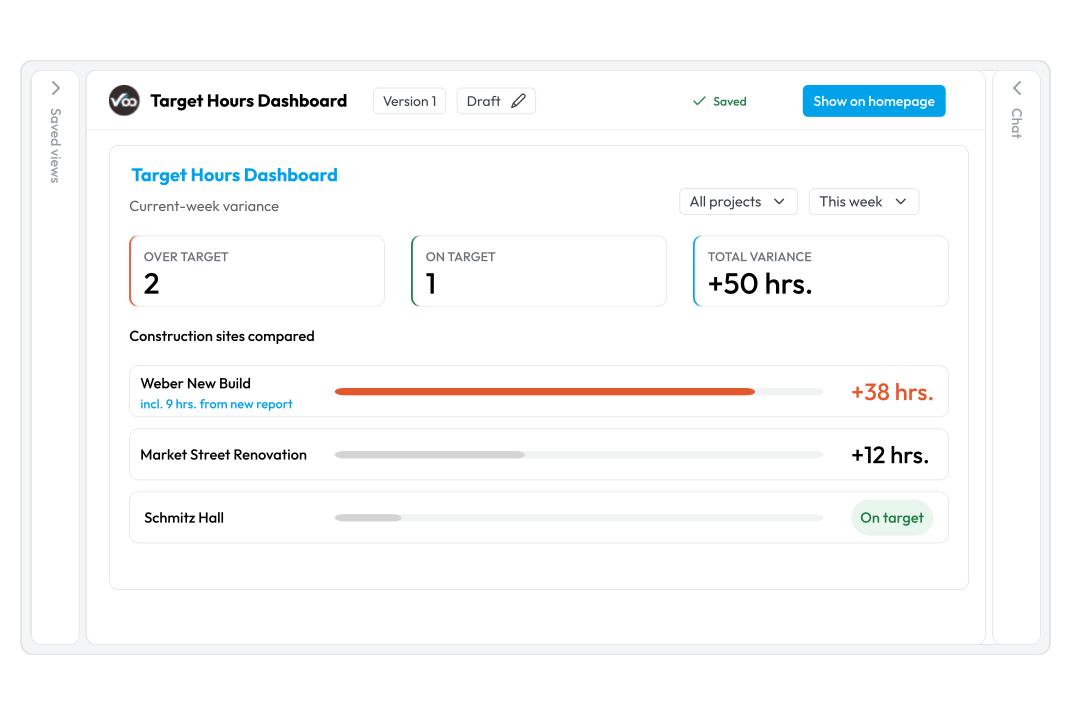
“Build me a dashboard that shows per job site how hours are running against plan.”
Construction labor tracking as planned vs. actual, with nobody maintaining a spreadsheet.
For: owners, office admin
“Show me per employee and week who was out when.”
Sick, vacation, unexcused — at a glance instead of across four lists.
For: office admin, owners
“Bundle all the city utility projects into one view.”
One client, several job sites, one view — for your next meeting with the client.
For: owners, successors
Because hours, reports, and notifications flow in from the job site continuously, you can also build a post-project cost review as its own view: what actually went in, against what was planned. Construction cost tracking and project cost control need no separate costing system — the reporting grows out of the execution itself.
Building a construction project dashboard here means: describing what goes on it.
→The view stays. Saved, versioned, ready to reopen anytime.
→The view grows with you. New data from the job site lands in it automatically.
→The view belongs to the team. Publish it, share it, develop it together.
→The view is allowed to change. If something’s off, you describe the change — new version, done.
Sample view with demo data.
To be clear: in Valoon Studio you build your own views and dashboards for project controls and operational construction reporting. Fixed, recurring documents like the construction daily log live under Reports.
Four people, four views — one data source.
Sample views with demo data.
That’s how construction KPIs happen without a controlling team: every role builds the view it needs, the data source stays the same. Construction reporting spreads across the roles instead of hanging on one person. Also for trades businesses.
In most companies, construction reporting means: no analysis at all — or Excel. That’s exactly what Studio is up against.
| Criteria | Excel — or no analysis at all | Valoon Studio |
|---|---|---|
| Where do you start? | ✕a blank spreadsheet | ✓a description, or one of ten ready-made example views |
| Where do the numbers come from? | ✕retyping, exporting, copy-pasting | ✓from what’s already in Valoon |
| New analysis | ✕build it yourself, maintain formulas | ✓describe it — Studio builds it |
| When something changes | ✕rebuild the spreadsheet | ✓re-describe it, new version |
| Freshness | ✕as of the last export | ✓keeps working with live data |
| In the team | ✕file by email, three versions floating around | ✓one saved view, shared |
| Prerequisite | ✕someone who knows Excel | ✓being able to describe what you need |
What if we already have Power BI or Tableau? There, you build the database first and the dashboard second — a project that takes weeks. In Studio you describe the view, and the construction data is already in it. Even as construction reporting software, Studio still doesn’t replace an ERP or your accounting: those cover financial reporting and job costing — Studio covers the operational side, the project controls questions that come out of execution.
No formulas, no training, no new app on the job site.
“Another app that dies on the job site?”
No. Studio is an area inside your existing Valoon and is used in the office. Nothing changes on the job site — no rollout, no relearning.
“Do I need to know how to build dashboards?”
No. You describe the view in your own words, Studio builds it. And you don’t start from zero: ready-made example views are included.
“Is it secure?”
Valoon is GDPR-compliant and hosted in Germany. Studio only works with the data in your own account.
GDPR-compliant, hosted in Germany.
Valoon Studio is an area inside the Valoon construction software. With Valoon, you pay for office seats — your crews on the job site are included for free. What that means for your company in concrete terms, we’ll sort out in a 20-minute demo call. See pricing
Construction reporting means continuously tracking and analyzing construction projects — labor hours, costs, material, and progress — against the plan. There’s financial reporting (accounting, estimating, invoicing, WIP reports) and operational reporting (what actually happens on the job site). Valoon Studio focuses on operational reporting: you build the views on the data created during execution. That covers site-level project controls — the level where hours and material actually occur. The most important construction KPIs in operational reporting: labor hours planned vs. actual, daily-report completeness, reported disruptions, open tasks, and absences.
Valoon Studio is built for construction and trades companies with roughly 20 to 200 employees that run their own crews on site and already use Valoon. Inside the company, it’s mainly owners, site managers, project managers, and office admin who build their own views. For companies this size, construction reporting has mostly meant Excel work in the office — exactly the work that goes away. AI in construction pays off precisely where lots of small pieces of information pile up daily with nobody analyzing them — with several simultaneous job sites, that’s practically always the case. If you’d rather talk than type: site reports can also be dictated via voice AI.
No — you describe, Studio builds. You don’t need BI skills. There are also ready-made templates to start from, so you never face a blank page.
Analyzing project data without Excel in Valoon Studio means: you describe the view you need, and Studio builds it — no exports, no spreadsheets. Your own dashboards work the same way: you say in your own words what should be on them — say, labor hours and open tasks — and Studio builds the view from the live job-site communication in Valoon. That’s also how you spot early which projects are going off the rails: by building a view that puts hours, disruptions, and open tasks side by side, instead of waiting for month-end.
By building your own view with it. A site manager describes, for example, “everything that’s open on my job sites” — and has their site-manager dashboard, without calling anyone.
Valoon Studio analyzes the project data already in your Valoon: recorded working hours, tasks and tickets, reports, photos, and project communication. There’s no data import and no external data source. Because Valoon automatically assigns messages, photos, and hours to the right project, your site documentation is already structured — that’s the base you build your views on. Valoon Studio doesn’t take actions on its own: it doesn’t order material, doesn’t change projects, and doesn’t make decisions. What happens with the result is up to you.
Yes. Every view you build stays under “Saved views,” can be edited further, and shared with your team. It keeps working with live data — you build it once, not every month.
Your data is stored on German servers. Valoon is GDPR-compliant and uses the official WhatsApp Business API. Valoon Studio only works inside your own account.
Jörg Wöhrle
Managing Director bad & heizung Bühlerzell GmbH
Maximilian Budau
Project Manager at P.A. Budau GmbH & Co. KG
Maximilian Bräunel
Co-founder at feld7 Studio for Architecture, Project Manager at IBB Engineering Office for Civil Engineering
Dominik Steuer
Managing Director Steuer Group
Valoon Studio
In 20 minutes we’ll show you Studio on a real construction project. Bring the question that’s been on your mind most this week.
✓Free ✓No prep needed ✓No installation
You are currently viewing a placeholder content from Calendly. To access the actual content, click the button below. Please note that doing so will share data with third-party providers.
More Information